파일:Argument principle1.svg
둘러보기로 이동
검색으로 이동

SVG 파일의 PNG 형식의 미리보기 크기: 212 × 173 픽셀. 다른 해상도: 294 × 240 픽셀 | 588 × 480 픽셀 | 941 × 768 픽셀 | 1,255 × 1,024 픽셀 | 2,510 × 2,048 픽셀
원본 파일 (SVG 파일, 실제 크기 212 × 173 픽셀, 파일 크기: 11 KB)
파일 설명
| 설명 |
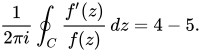
Français : Principe de l'argument English: Argument principle. The simple contour C (black), the zeros of f (blue) and the poles of f (red). Here we have |
|||
| 날짜 | ||||
| 출처 | 자작 | |||
| 저자 | Archibald | |||
| 다른 버전 |
|
|||
| SVG 발전 |


라이선스

|
이 작품은 저작자인 Archibald에 의해 퍼블릭 도메인으로 공개된 작품입니다. 이 공개 선언은 전 세계적으로 유효합니다. 만약 저작권의 포기가 법률적으로 가능하지 않은 경우, Archibald은 이 작품을 법적으로 허용되는 한도 내에서 누구나 자유롭게 어떤 목적으로도 제한 없이 사용할 수 있도록 허용합니다. |
Source code
function main() % draw a closed spline curve with some points inside

   curve_linewidth=1.8;  arrowsize=8; arrow_type=2; % make filled trig arrow
   ball_radius=0.015; % how big to make the points representing the zeros

   x=[0 1 1.2 0 0]; y=[0 0.1 1 1 0.5];  % points the spline will go thru

   n=length(x);
   P=5; Q=n+2*P+1; % P will denote the amount of overlap of the path with itself

% Make the 'periodic' sequence xp=[x(1) x(2) x(3) ... x(n) x(1) x(2) x(3) ... ]
% of length Q. Same for yp.
   for i=1:Q
      j=rem(i, n)+1; % rem() is the remainder of division of i by n
      xp(i)=x(j);
      yp(i)=y(j);
   end

% do the spline interpolation
   t=1:length(xp);
   N=100; % how fine to make the interpolation
   tt=1:(1/N):length(xp);
   xx=spline(t, xp, tt);
   yy=spline(t, yp, tt);

% discard the redundant overlap pieces
   start=N*(P-1)+1;
   stop=N*(n+P-1)+1;
   xx=xx(start:stop);
   yy=yy(start:stop);

   figure(1); clf; hold on; axis equal; axis off; % prepare the screen
   plot(xx, yy, 'k', 'LineWidth', curve_linewidth)% plot the path

% plot the residues and the poles -- see the ball() function below
   ball(0.5,       0.7,    ball_radius, [1, 0, 0]); % red
   ball(0.3187,    0.3024, ball_radius, [0, 0, 1]); % blue
   ball(0.7231,    0.4441, ball_radius, [0, 0, 1]);
   ball(0.7981,    0.7776, ball_radius, [0, 0, 1]);
   ball(0.2854,    0.8026, ball_radius, [1, 0, 0]);
   ball(0.6397,    0.1773, ball_radius, [1, 0, 0]);
   ball(0.2896,    0.5525, ball_radius, [0, 0, 1]);
   ball(0.9774,    0.5817, ball_radius, [1, 0, 0]);
   ball(0.6189,    1.0068, ball_radius, [1, 0, 0]);

   % place the two arrows showing the orientation of the contour
   shift=80; arrow([xx(shift) yy(shift)], [xx(shift+10) yy(shift+10)], ...
		   curve_linewidth, arrowsize, pi/8,arrow_type, [0, 0, 0])
   shift=270; arrow([xx(shift) yy(shift)], [xx(shift+10) yy(shift+10)], ...
		    curve_linewidth, arrowsize, pi/8,arrow_type, [0, 0, 0])

   axis([min(xx)-1, max(xx)+1, min(yy)-1, max(yy)+1]); % image frame

   saveas(gcf, 'argument_principle.eps', 'psc2')% save to file
   disp('Saved to argument_principle.eps. Get antialiased .png in an editor.')

   %%%%%%%%%%%%%%%%%%%%% auxiliary functions ball() and arrow() %%%%%%%%%%%%%%%%%%

function ball(x, y, radius, color) % draw a ball of given uniform color
   Theta=0:0.1:2*pi;
   X=radius*cos(Theta)+x;
   Y=radius*sin(Theta)+y;
   H=fill(X, Y, color);
   set(H, 'EdgeColor', color);

function arrow(start, stop, thickness, arrowsize, sharpness, arrow_type, color)

%  draw a line with an arrow at the end
%  start is the x,y point where the line starts
%  stop is the x,y point where the line stops
%  thickness is an optional parameter giving the thickness of the lines
%  arrowsize is an optional argument that will give the size of the arrow
%  It is assumed that the axis limits are already set
%  0 < sharpness < pi/4 determines how sharp to make the arrow
%  arrow_type draws the arrow in different styles. Values are 0, 1, 2, 3.

%       8/4/93    Jeffery Faneuff
%       Copyright (c) 1988-93 by the MathWorks, Inc.
%       Modified by Oleg Alexandrov 2/16/03


   if nargin <=6
      color=[0, 0, 0]; % default color
   end

   if (nargin <=5)
      arrow_type=0;   % the default arrow, it looks like this: ->
   end

   if (nargin <=4)
      sharpness=pi/4; % the arrow sharpness - default = pi/4
   end

   if nargin<=3
      xl = get(gca,'xlim');
      yl = get(gca,'ylim');
      xd = xl(2)-xl(1);
      yd = yl(2)-yl(1);
      arrowsize = (xd + yd) / 2;   % this sets the default arrow size
   end

   if (nargin<=2)
      thickness=0.5; % default thickness
   end


   xdif = stop(1) - start(1);
   ydif = stop(2) - start(2);

   if (xdif == 0)
      if (ydif >0)
	 theta=pi/2;
      else
	 theta=-pi/2;
      end
   else
      theta = atan(ydif/xdif);  % the angle has to point according to the slope
   end

   if(xdif>=0)
      arrowsize = -arrowsize;
   end

   if (arrow_type == 0) % draw the arrow like two sticks originating from its vertex
      xx = [start(1), stop(1),(stop(1)+0.02*arrowsize*cos(theta+sharpness)),...
	    NaN,stop(1), (stop(1)+0.02*arrowsize*cos(theta-sharpness))];
      yy = [start(2), stop(2), (stop(2)+0.02*arrowsize*sin(theta+sharpness)),...
	    NaN,stop(2), (stop(2)+0.02*arrowsize*sin(theta-sharpness))];
      plot(xx,yy, 'LineWidth', thickness, 'color', color)
   end

   if (arrow_type == 1)  % draw the arrow like an empty triangle
      xx = [stop(1),(stop(1)+0.02*arrowsize*cos(theta+sharpness)), ...
	    stop(1)+0.02*arrowsize*cos(theta-sharpness)];
      xx=[xx xx(1) xx(2)];

      yy = [stop(2),(stop(2)+0.02*arrowsize*sin(theta+sharpness)), ...
	    stop(2)+0.02*arrowsize*sin(theta-sharpness)];
      yy=[yy yy(1) yy(2)];

      plot(xx,yy, 'LineWidth', thickness, 'color', color)

%     plot the arrow stick
      plot([start(1), stop(1)+0.02*arrowsize*cos(theta)*cos(sharpness)],  ...
	   [start(2), stop(2)+0.02*arrowsize*sin(theta)*cos(sharpness)], ...
	   'LineWidth', thickness, 'color', color)

   end

   if (arrow_type==2) % draw the arrow like a full triangle
      xx = [stop(1),(stop(1)+0.02*arrowsize*cos(theta+sharpness)), ...
	    stop(1)+0.02*arrowsize*cos(theta-sharpness),stop(1)];

      yy = [stop(2),(stop(2)+0.02*arrowsize*sin(theta+sharpness)), ...
	    stop(2)+0.02*arrowsize*sin(theta-sharpness),stop(2)];
      H=fill(xx, yy, color);% fill with black
      set(H, 'EdgeColor', 'none')

%     plot the arrow stick
      plot([start(1) stop(1)+0.01*arrowsize*cos(theta)], ...
           [start(2),     stop(2)+0.01*arrowsize*sin(theta)], ...
	 'LineWidth', thickness, 'color', color)
   end

   if (arrow_type==3) % draw the arrow like a filled 'curvilinear' triangle
      curvature=0.5; % change here to make the curved part more (or less) curved
      radius=0.02*arrowsize*max(curvature, tan(sharpness));
      x1=stop(1)+0.02*arrowsize*cos(theta+sharpness);
      y1=stop(2)+0.02*arrowsize*sin(theta+sharpness);
      x2=stop(1)+0.02*arrowsize*cos(theta)*cos(sharpness);
      y2=stop(2)+0.02*arrowsize*sin(theta)*cos(sharpness);
      d1=sqrt((x1-x2)^2+(y1-y2)^2);
      d2=sqrt(radius^2-d1^2);
      d3=sqrt((stop(1)-x2)^2+(stop(2)-y2)^2);
      center(1)=stop(1)+(d2+d3)*cos(theta);
      center(2)=stop(2)+(d2+d3)*sin(theta);

      alpha=atan(d1/d2);
      Alpha=-alpha:0.05:alpha;
      xx=center(1)-radius*cos(Alpha+theta);
      yy=center(2)-radius*sin(Alpha+theta);
      xx=[xx stop(1) xx(1)];
      yy=[yy stop(2) yy(1)];

      H=fill(xx, yy, color);% fill with black
      set(H, 'EdgeColor', 'none')

%     plot the arrow stick
      plot([start(1) center(1)-radius*cos(theta)], [start(2), center(2)- ...
		    radius*sin(theta)], 'LineWidth', thickness, 'color', color);
   end
파일 역사
날짜/시간 링크를 클릭하면 해당 시간의 파일을 볼 수 있습니다.
| 날짜/시간 | 섬네일 | 크기 | 사용자 | 설명 | |
|---|---|---|---|---|---|
| 현재 | 2009년 7월 22일 (수) 18:51 | | 212 × 173 (11 KB) | wikimediacommons>Archibald~commonswiki | {{Information |Description={{fr|1=Principe de l'argument}} |Source=travail personnel (own work) |Author=Archibald |Date=20090722 |Permission= |other_versions= }} Category:Complex analysis |
이 파일을 사용하는 문서
다음 문서 1개가 이 파일을 사용하고 있습니다:
